Brand
ZOYI multimeters in TestNMeasure
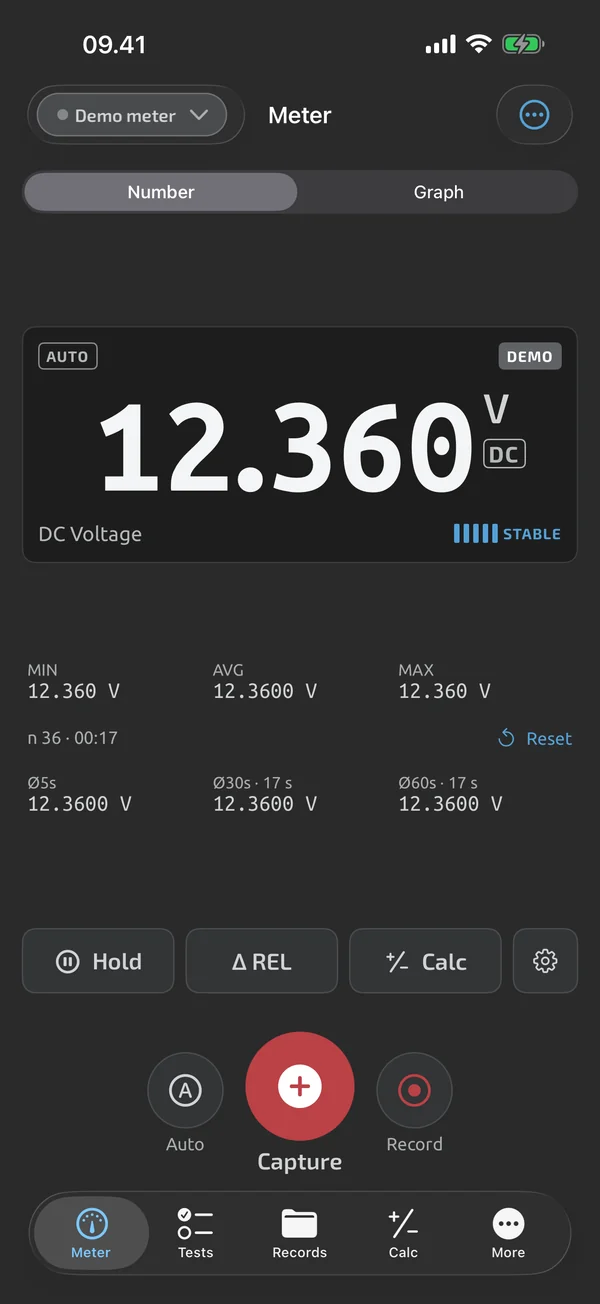
ZOYI is the multimeter brand of Zotek Instruments in Shenzhen. TestNMeasure reads its Bluetooth meters live on the phone: the value and unit large on screen, with graph, hold, logging and guided test sequences on top.
See the ZOYI meters in our shop
iPhone and iPad (iOS 17 or later): free on the App Store. Android later.
ZOYI models
| Meter | Type | Link | State | Notes |
|---|---|---|---|---|
| ZOYI ZT-5B | Multimeter | Bluetooth LE built in | Verified by us | Slim handheld, 6000 counts, True RMS. Live readout. |
| ZOYI ZT-5BQ | Clamp meter | Bluetooth LE built in | Supported | Clamp meter to 600 A AC, 6000 counts, True RMS. |
| ZOYI ZT-300AB | Multimeter | Bluetooth LE built in | Supported | Handheld, 6000 counts, True RMS. |
| ZOYI ZT-5566S | Multimeter | Bluetooth LE built in | Supported | Desktop meter and Bluetooth speaker, 19999 counts, True RMS. |
| ZOYI ZT-5566SE | Multimeter | Bluetooth LE built in | Supported | |
| ZOYI ZT-6S | Multimeter | Bluetooth LE built in | Not supported |
Verified by us: checked on hardware. Supported: read through a driver checked on a sibling model. Should work: same family, not checked. Not supported: no live Bluetooth reading yet; type the readings by hand. All brands · All meters
What the meter sends
In plain words, a ZOYI meter sends the reading and its unit over Bluetooth, about three times a second. That is all it sends. The app shows what the meter sends and does not change how it measures.
To connect, turn on the meter's Bluetooth: on the ZT-5B with a short press of the power button, on other models as their manual describes. A Bluetooth symbol appears on the meter's display, and the meter shows up in the app's scan list as Bluetooth DMM. Tap it to connect; the app reconnects to your last meter on launch and after drops.
What is not available
A ZOYI meter only streams its readings, so the app cannot set the meter's function, range or hold. Use the app's own hold, REL and min/max.
Other ZOYI models
Meters from Aneng, BSIDE, BABATools and HOKI use the same Bluetooth protocol. Other ZOYI meters may use it too. Only the models in the table are claimed. Have another one? Mail its model to support@testnmeasure.app.
What it does and doesn't do (yet)
| What it does | Plan |
|---|---|
| Finds supported Bluetooth meters nearby and lists them, with a clear path when Bluetooth or its permission is missing. | Free |
| Tap a result to connect; the meter becomes the active instrument and live readings start. | Free |
| Reconnects to your last meter on launch and after drops, and always shows the connection state. | Free |
| Keeps a list of your instruments with names you choose, so every reading is tied to the meter that took it. | Free |
| A simulated meter lets you try the whole app without hardware; it is labelled DEMO everywhere. | Free |
| Type the reading from any instrument; typed values are marked as manual. | Free |
| A large readout that shows which digits have settled; OL and UL are shown as OL and UL, never as a number. | Free |
| Swipe the readout to a live graph with min and max lines, pan and zoom. | Free |
| Hold freezes the displayed reading and statistics in the app, independent of the meter's own HOLD. | Free |
| Shows the running minimum, maximum and average since the last reset, with the sample count. | Free |
| Shows rolling averages over the last 5, 30 and 60 seconds. | Free |
| REL shows the difference from a stored reference, for example to null out test-lead resistance. | Free |
| Five stability bars show when a reading is steady. | Free |
| A landscape layout for the meter and run screens. | Free |
| Keeps the screen on while you measure, run a test or record. | Free |
| One tap saves the current reading, with an Undo. | Free |
| Log sessions hold captures and time-series recordings, and recording continues with the screen locked. | Free |
| Add a text note and a short label to any capture. | Free |
| Attach up to 5 photos to a capture. | Free |
| Record a voice note of up to 2 minutes on a capture. | Free |
| Scale readings with a factor and an offset, for clamp adapters, shunts and probe dividers; the raw reading is kept. | Free |
| Search and filter your history; deleted items stay in Recently deleted for 30 days. | Free |
| Review a session as a full graph with pan and zoom, statistics and its captures. | Free |
| Auto-record saves a capture when the reading becomes stable. | Free |
Not yet, or not planned
- One live Bluetooth meter at a time for now; two meters at once (voltage and current, with power) is coming.
Questions
Which ZOYI meters work with TestNMeasure?
All four in the table: the ZT-5B, ZT-5BQ, ZT-300AB and ZT-5566S. The ZT-5B is verified by us: live readings were checked against the meter's display. The other three are supported through the same ZOYI driver. Each model page lists what is still to be checked.
Do I need the maker's own app as well?
No. TestNMeasure connects to the meter by itself. If the meter does not show up in the scan list, close the maker's own app: it may still hold the connection.
Can I connect two ZOYI meters at once?
No. One live Bluetooth meter is connected at a time. Your instrument list remembers each meter by name.
ZOYI and Zotek are trademarks of their owner; TestNMeasure is not affiliated with or endorsed by Zotek.
Try it in the demo
A simulation of the app in your browser, with made-up readings: no meter and no install needed.
Get TestNMeasure for iPhone and iPad.
iPhone and iPad (iOS 17 or later): free on the App Store. Android later.


Questions or a meter to suggest? Mail support@testnmeasure.app.
No ad networks, no sign-up.